
.jpg)
AI Tool for Sketch to Render: How Archivinci Turns Ideas into Realistic Renders Instantly
Introduction
Have you ever had a brilliant design idea but struggled to visualize it clearly? Maybe you sketched something quickly on paper or created a rough 3D model, only to realize that transforming it into a realistic render would take hours — or even days. That’s a common frustration among architects, designers, and students alike.
This is exactly where Archivinci, an AI tool for sketch-to-render conversion, steps in to change the game. Archivinci takes your hand-drawn sketches, photos, or even screenshots of 3D models and transforms them into high-quality, realistic renders — all in a matter of seconds.
In today’s fast-paced design world, where deadlines are tight and clients expect visual clarity, Archivinci helps you move seamlessly from concept to visualization. Whether you’re a professional architect presenting ideas to clients or a student preparing for studio submissions, this AI tool makes design communication faster, clearer, and more inspiring.
By the end of this article, you’ll understand what Archivinci is, how it works, why it’s becoming a must-have design companion, and how you can use it to bring your sketches to life instantly.

What Is Archivinci?
Archivinci is an AI-powered rendering platform built specifically for architects and designers. Unlike generic image generators, Archivinci is trained to understand architectural forms, materials, textures, and spatial relationships. This means it doesn’t just make pretty pictures — it intelligently interprets your design intent.
You can upload a sketch, photograph, or 3D screenshot, and within seconds, Archivinci creates a realistic visualization that captures the essence of your concept. Whether you’re illustrating a residential façade, an office interior, or an entire masterplan, the tool adapts effortlessly to your needs.
Archivinci simplifies the complex rendering process, making professional-quality visuals accessible to anyone — even those without technical expertise in tools like Revit, Rhino, or Blender.

How Archivinci Works — From Sketch to Render
Let’s break down how this AI rendering tool functions — it’s as intuitive as it is powerful.
Step 1: Upload Your Image or Sketch
You can start with a photo, a hand-drawn sketch, or even a 3D model screenshot. The platform supports a range of inputs, ensuring flexibility no matter how you begin your design process.
Step 2: Choose Your Similarity Level
This feature controls how closely the final render sticks to your input. For instance, “Similar” produces a faithful transformation, while “Creative” lets the AI take artistic liberty, experimenting with forms, colors, and details.
Step 3: Select a Render Style
Archivinci offers a variety of rendering aesthetics — from Modern Minimalist and Concrete Brutalist to Country, Traditional, and Art Deco. You can experiment with multiple styles to find the one that fits your project’s vision.
Step 4: Generate Your Render
Once you’ve set your preferences, the AI processes your image and delivers a detailed render within seconds. The output captures light, shadow, material texture, and depth, giving your idea a photorealistic finish.


Rearrange furniture's - textures or elements with the image editor.
2. Mood board to render

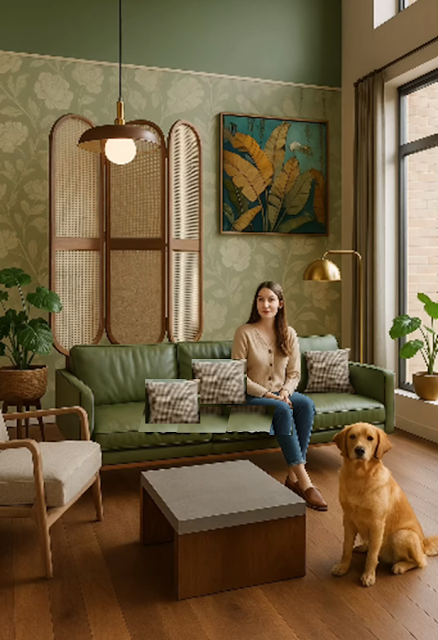
Turn a simple collage into a render
3. Different angle generator

Instantly get Top view,

Side view

of any image using the different angle tool.
4. Image to line drawing


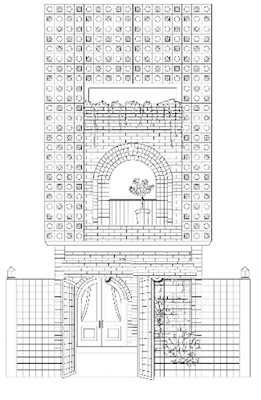
Can covert any image into a clean 2d line drawing.
Key Features That Make Archivinci Stand Out
Archivinci stands apart from other AI tools because it’s designed with architectural intent in mind. Let’s explore what makes it so special.
1. Multi-Input Compatibility
Unlike typical AI art generators that work only with text prompts, Archivinci accepts multiple types of input — from sketches to 3D model screenshots. Whether you’re doodling ideas on paper or exporting from SketchUp, you can visualize your design in seconds.
2. Instant Rendering Power
Traditional rendering can take hours, sometimes even overnight. Archivinci bypasses all that by running on cloud-based AI models that process images instantly — producing results that look like they were rendered in V-Ray or Enscape.
3. Diverse Architectural Styles
Every designer has a unique vision. Archivinci lets you explore different aesthetics without redoing your entire model. Want to see your design in a rustic country finish? Or a sleek modern glass façade? You can preview both in seconds.
4. Simple Editing and Refinement
You can tweak materials, textures, or colors in your render without restarting the process. This makes it a practical tool for iterative design — where feedback loops are faster and more visual.
5. No Technical Learning Curve
Forget long tutorials or rendering setups. Archivinci’s clean interface makes it usable even for beginners. Anyone can create presentation-ready renders without needing to understand rendering engines or lighting settings.

Applications of Archivinci in Architecture and Design
Archivinci isn’t limited to architects — its utility spans a wide range of design disciplines.
For Architects
Archivinci helps architects quickly visualize design options and present ideas to clients. Instead of spending days producing concept renders, you can produce several high-quality images during early design discussions.
For Interior Designers
Designers can visualize interior layouts, furniture arrangements, and color schemes instantly. This helps in communicating spatial feel and atmosphere to clients, even before full modeling.
For Students and Educators
Architecture students can bring studio projects to life without needing heavy rendering setups. It’s also a great tool for educators to demonstrate design evolution — from sketch to final visualization — during classes.
For Urban Planners and Developers
Archivinci’s Masterplan Coloring Tool allows users to visualize large-scale plans with realistic textures, helping city planners and developers understand form, density, and spatial hierarchy visually.

How Archivinci Improves the Design Process
Great design depends on clear communication — and Archivinci bridges that gap perfectly.
Traditionally, architects needed to convert sketches into 3D models, adjust lighting, assign materials, and render images. This workflow, while detailed, consumed hours of time and computing power. Archivinci flips that narrative. It gives you instant feedback on your ideas, allowing you to experiment, iterate, and evolve designs faster than ever.
By integrating AI early in the creative process, designers can explore multiple concepts before committing to one. This accelerates client approvals and promotes creative freedom — because visualizing options no longer comes with time or resource constraints.
In essence, Archivinci isn’t just a rendering tool; it’s a design accelerator.
Realistic Rendering Styles You Can Explore
Archivinci gives users a playground of visual styles. Each render captures mood, lighting, and texture specific to that aesthetic.
- Modern Minimalist: Sleek lines, open spaces, and neutral tones that highlight structure and simplicity.
- Concrete Brutalist: Rough textures, raw finishes, and dramatic shadows for industrial appeal.
- Traditional Classic: Warm materials, ornamental details, and inviting color palettes.
- Country Rustic: Natural wood, soft tones, and cozy atmospheres perfect for homes.
- Art Deco / Eclectic: Bold colors, geometric patterns, and vibrant compositions for statement projects.
These style options make Archivinci more than a render engine — it becomes an idea exploration partner.

Why Archivinci Is the Future of Architectural Visualization
Artificial Intelligence isn’t replacing designers — it’s amplifying their creativity.
Archivinci represents the next step in democratizing architectural visualization. By removing technical barriers, it empowers anyone with a design idea to see it realized. The result? Faster workflows, improved client understanding, and more sustainable design decisions.
As technology continues to evolve, tools like Archivinci will become an essential part of architectural workflows — combining speed, intelligence, and imagination.
It’s not just about rendering faster; it’s about thinking differently.

Common Questions About Archivinci
Q1: Is Archivinci free to use?
Yes! You can create an account for free and try out the rendering tool with limited credits before upgrading.
Q2: What kind of input files does it support?
You can upload sketches, photos, and screenshots from your 3D modeling software.
Q3: Does it work for interior renders?
Yes, Archivinci can render both exteriors and interiors — from small rooms to complex layouts.
Q4: How long does it take to render an image?
Most renders take under 30 seconds, depending on internet speed and complexity.
Q5: Can it handle masterplans?
Yes, Archivinci includes a Masterplan Coloring Mode designed for large-scale urban and landscape projects.
Conclusion
In an industry where visuals speak louder than words, Archivinci stands as a revolutionary ally for designers. It translates creativity into imagery faster than any traditional tool — allowing more time for innovation, refinement, and storytelling.
Whether you’re designing a single-family home, a commercial interior, or a city-scale development, Archivinci ensures your ideas don’t stay hidden in sketches. With its simple interface, style versatility, and near-instant output, it redefines what’s possible in architectural visualization.
Because design isn’t just about seeing — it’s about imagining intelligently.
So next time you sketch an idea, don’t wait for days to visualize it. Upload it to Archivinci and watch your imagination come to life.


.jpg)


.jpg&description=AI Tool for Sketch to Render: How Archivinci Turns Ideas into Realistic Renders Instantly)
0 Comments